Flutter UI kit · v1.0.0
Start your business app at the product, not the plumbing.
Tarn UI is a complete Flutter kit for dashboards and back-office apps: nine finished screens, forty-plus widgets and hand-painted charts — themed, responsive and tested from phone to desktop.
One-time payment · Full source · Unlimited apps
- production screens
- 9production screens
- widgets
- 40+widgets
- chart types
- 4chart types
- runtime dependencies
- 0runtime dependencies
The screens
Real screens with real states, not static mockups.
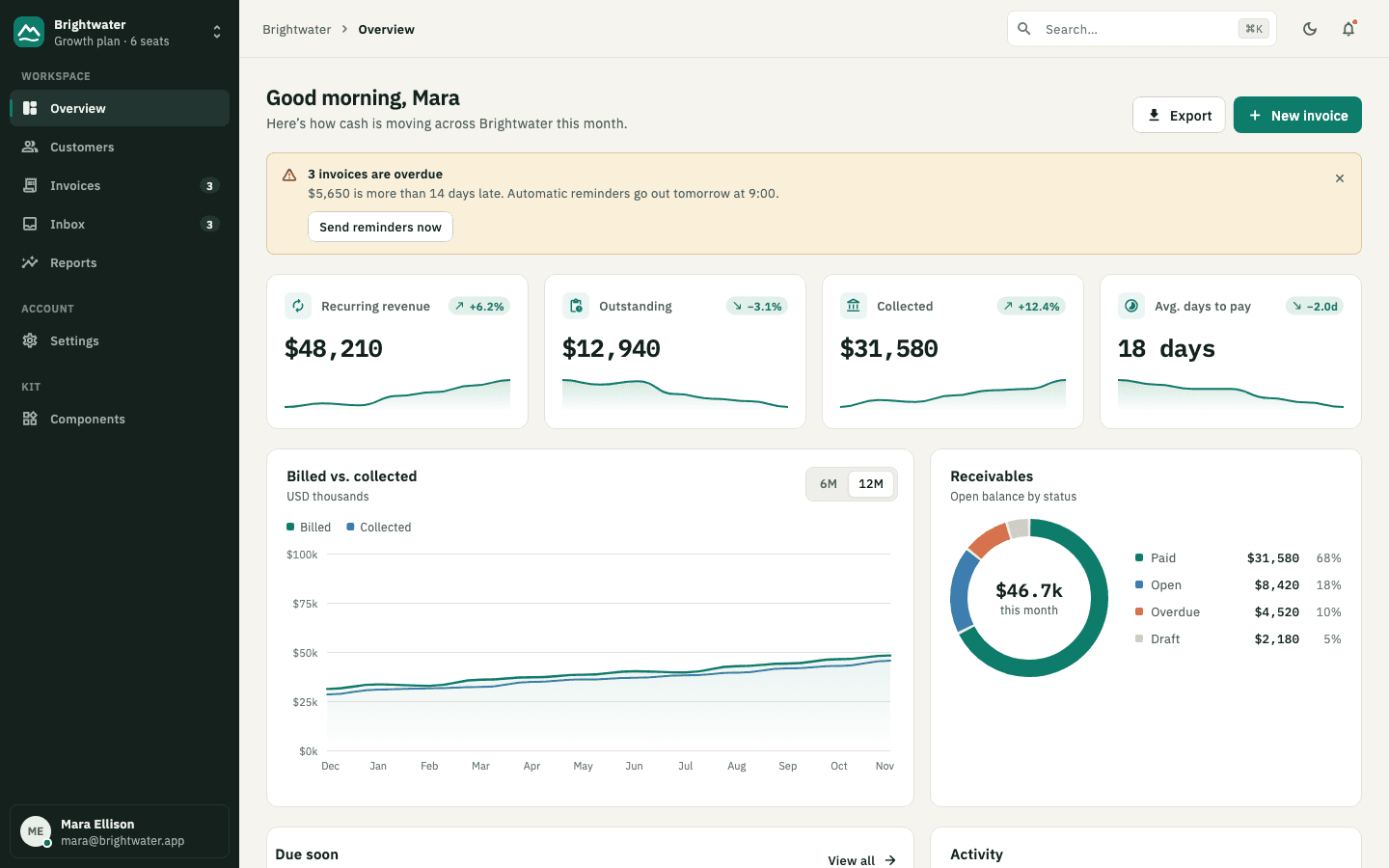
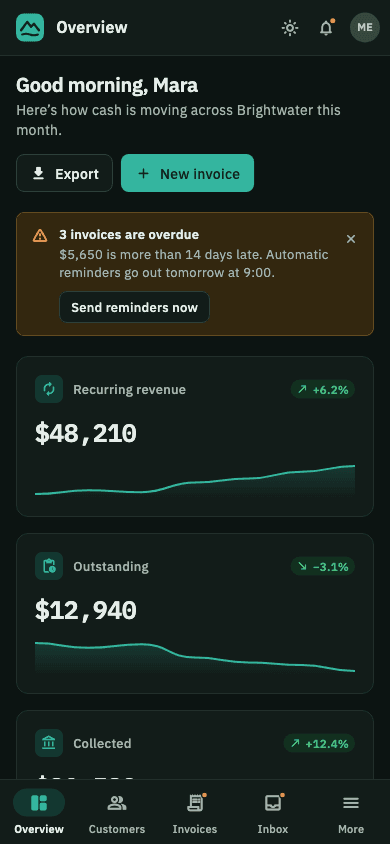
Every screenshot here is rendered from the kit itself. Search filters, tables sort, the composer sends, the code field verifies — wire them to your data and ship.
Metric tiles with sparklines, a 6/12-month revenue chart with hover tooltips, receivables donut, due-soon list and an activity timeline.
Under the surface
The parts you’d otherwise build twice.
One theme, any brand
A single TarnColors extension holds the palette. TarnTheme.fromSeed() rebrands buttons, focus rings, tints and the lead chart series in one line — with text contrast checked by the test suite.
A shell that adapts
TarnAppShell shows a sectioned sidebar on desktops, a rail on tablets and a bottom bar with a “More” sheet on phones. Same destinations, no duplicated layouts.
Charts, hand-painted
Line, bar, donut and sparkline charts drawn with CustomPainter: readable axis ticks, hover and drag tooltips, stacked or grouped bars. No chart package to keep up with.
Accessible by default
Visible focus rings, keyboard activation, semantic labels for icon buttons and charts, and skeletons that stop animating when the system asks for reduced motion.
Tested at three sizes
Every screen renders at phone, tablet and desktop widths in light and dark, with the real fonts loaded, and fails the build on any layout overflow.
Plain Flutter
Widgets take values and callbacks, nothing else. Bring Riverpod, BLoC or setState — the kit doesn't care. IBM Plex is bundled under the SIL Open Font License.
A few lines to a themed app
Your color in, a consistent product out.
Pick a brand color and Tarn derives the rest: the accent shade, its soft tint, the lead chart series and a text color that stays readable on top — in light and dark.
import 'package:flutter/material.dart';
import 'package:tarn_ui/tarn_ui.dart';

void main() => runApp(
  MaterialApp(
    theme: TarnTheme.fromSeed(const Color(0xFF3D5AFE)),
    darkTheme: TarnTheme.fromSeed(
      const Color(0xFF3D5AFE),
      brightness: Brightness.dark,
    ),
    home: const TarnOverviewScreen(),
  ),
);
In the zip
- lib/The tarn_ui package — theme, widgets, charts, shell and screens
- example/Showcase app with every screen and the component gallery
- test/Widget tests, including the overflow matrix
- fonts/IBM Plex Sans and Mono (OFL)
- README.mdSetup, theming and a tour of the API
- LICENSE.mdYour per-seat commercial license
Requires Flutter 3.27 or newer. Read the docs →
Pricing
Pay once. Choose your updates window and seats.
No subscription and no per-app fees.
- Full Dart source for every widget, chart and screen
- Runnable showcase app (web, iOS, Android, macOS)
- Light, dark and seed-color theming
- Widget tests and the overflow test matrix
- Use in unlimited commercial apps
Your package
1 developer · 12 months of updates
$79.99
One-time payment
Keep every version you download, forever. Updates released in the next 12 months are included.
Compare all 12 packagesshowhide
| Updates | 1 developer | 2 developers | 3 developers | 4 developers |
|---|---|---|---|---|
| 3 months | ||||
| 6 months | ||||
| 12 months |
Questions about the license? Read it in plain English.
What exactly do I download?
A zip with the tarn_ui Flutter package (full Dart source), a runnable showcase app, the widget test suite, the bundled IBM Plex fonts, and a README, CHANGELOG and LICENSE. You add it to your project as a path or git dependency — there is nothing to install from pub.dev and no account to create.
How do developer seats work?
One seat covers one developer who works with the kit's source. Everyone else on the team — designers, QA, people who only use the apps you ship — doesn't need a seat. Each seat can be used on unlimited apps, for yourself or for clients.
What happens when my updates window ends?
Nothing breaks. You keep every version you downloaded and can keep shipping apps built with them forever. The window only decides which new releases you're licensed to use. There is no subscription and nothing renews automatically; if you want later releases, buy a new package.
Does it work with my state management?
Yes. Widgets take plain values and callbacks — no Provider, Riverpod, BLoC or GetX inside the kit. The screens hold their own demo state so you can see them work, and are written to be copied into your app and wired to your data.